Showing posts with label Design. Show all posts

Friday, September 30, 2011

Tools - SweetHome3D

Unless it is an apartment or other tightly strata managed property, home building is never a cookie cutter affair. Homes by nature are as individual as those who live in them. Whilst you can look at a plan and say that is a Rendezvous by Ventura, or a Monarch by National Homes, or a Nautilus by Dale Alcock Homes, you will always find differences between the base plan and the finished product.

Example 2-D sketches created
using Microsoft Paint.
Our Rendezvous has definitely been personalised. We have moved built in robes, extended the kitchen and alfresco areas, and completely re-designed the wet areas.

When we initially began changing the plans, we used Microsoft Paint to edit a picture of the standard plan that we downloaded from Ventura’s website. This method is not precise, because the image we were working with was not to scale.

Despite these limitations, the above method is an excellent tool for recording our ideas. It was helpful to be able to take these pictures to our first sales meeting. Being able to show someone your ideas is always easier than trying to describe them. I have continued this trend whenever we need to communicate ideas to the builder.


Once you have scale plans, you are able to start looking at the specifics of home design, such as the size and placement of windows, kitchen and bathroom cabinet configurations, size of the shower recess, etc.

At this point, we outgrew Microsoft Paint and needed to find a proper home design package. Some people may think that creating a 3D model was overkill. Initially I would agree, but it has been invaluable because it has helped us to avoid last minute variations and unnecessary changes. Obviously, the more changes you made to the original plans, the more important a 3D model becomes.

For example, earlier I posted about our shower screen dilemma. The builder’s suggestion to add a small wall seemed a good idea in theory, especially as it would have allowed us to have a hidden recess for shampoo and soaps; however, it was a significant deviation from our original design.

I do not know about you, but when someone who has been doing this for a lot longer than I have makes a suggestion, I tend trust them more than I do myself.

If it was not for being able to visualise these changes by use of a model, we may not have decided to stick with our original design, even though that it required some legwork to find someone willing to install the shower screen after handover.


Our ensuite design showing the raised
areas and large shower screen


Screen capture from Sweethome 3D
showingthe 2D modelling view
and the 3D walk through view.

3-D render of our bathroom created
using Sweethome 3D
As an aside, having a 3D image of how we wanted our ensuite to look, helped immensely when looking for someone to install the shower screen. Trying to explain a bathroom with steps here, and raised areas there, is a lot harder than showing them a picture and saying “it looks like this”.

Home design software packages are plentiful. At this point in time I have far from scratched the surface of what is available. When I started looking for design tools, I was short on time. I needed a free package that was quick and easy to learn, which was capable of producing both 2D and 3D floor plans.


Whenever this topic arises, Google SketchUp appears to be one of the most popular answers. Whilst it is very powerful package, Sketch up was more I was looking for. Realistically, SketchUp is a CAD program, not a home design program.

On the opposite side of the scale is My Virtual Home. My Virtual Home is very user-friendly program that allows its users to rapidly create 3D models of their home design. Most of the people I speak to have used this program, and recommend it highly. Unfortunately, it drove me up the wall. I wanted a program that would allow me to enter precise dimensions and would not try to fix things for me. What I was looking for was something with the precision of SketchUp and the usability of My Virtual Home.


The solution to my problem was SweetHome3D. It allows you to:

  • draw straight, round or sloping walls with precise dimensions;
  • insert doors, windows and other furniture;
  • change the colour, texture, size, and orientation of furniture, walls, floors and ceilings;
  • simultaneously view your design in both 2D and 3;
  • annotate the plan showing room areas, dimension lines, and text; and,
  • create photorealistic images and video to export in a number of standard file formats
(For a full list of features visit: http://www.sweethome3d.com/features.jsp


The only real downside I have found to Sweet Home 3D is the inability to draw a roof on your home. For the most part, this did not bother me, as I was primarily interested in the house’s internal structure. The furniture models it comes bundled with are limited, but you can import a wide range from Google’s 3D Warehouse.


What software do you use to create 3D models of your home designs?

Friday, July 1, 2011

Design Dilemma - Ensuite Shower Screen

When we designed our ensuite, we forgot to ask one important question. What is the maximum width for a shower screen? According to our builder, the widest shower screen they will install is 1500mm. We wanted one that was 1910mm wide.

Our original bathroom design


What do you do when you are short 410mm of glass? Our builder suggested building a small wall/pillar. This pillar could go in one of three places: on the open end of the recess, in the middle, or on the right. My preference was to either hide it away in a corner or make a feature out of it.

I have been modelling our house using SweetHome3D. This is one of those times when having a 3D model really helps. Below are the three options for the placement of the pillar. Which do you prefer?


As suggested by our builder, having the pillar on the left
will provide additional support for the screen.

We could try to hide the pillar, by placing it on the right hand side.
This does mean that the shower screen will need some form of
roof/wall support on the open end.

Placing the pillar in the middle of the shower screen,
would provide a place to mount the bath filler.


Ventura has given us the option to install our own shower screen after handover. I have spoken to a few companies who install shower screens and opinions appear to be split as to whether a shower screen this big could/should be installed.

Who would have thought that 40cm of glass would be so troublesome? I must say thank you to everyone on the Homeone forum who has already offered an opinion and tried to help.


Update (20/07/2011): We have decided to accept a credit for the framed shower screen provided by Ventura. We will be installing our own frameless/semi-frameless shower screen after handover. Fingers crossed everything goes according to plan!

Sunday, June 26, 2011

Design - Lighting

Lighting design is one of those jobs that can easily fall off the bottom of your “things to do before Pre-Start” list.

Typically, builders install a batten in the centre of each room. In the case of bedrooms, this would be ok, however in a larger room like a kitchen or living area, this is not always sufficient.

Current lighting trends lean towards the installation of down-lights, which are not compatible with the “single light installed in the centre of the room” pattern of light fittings specified as standard by your builder.

Wall lights are not compatible with the builder-standard pattern either. It is equally important, if not more important, to decide whether you wish to use this style of lighting, because the wall will never look the same once it has been patched.

Pendants, oyster and fluorescent lights, however, are compatible with the builder-standard pattern and should not require you to patch old holes in your ceiling.

The last thing we want to do in our new home is patch the ceilings and walls. This placed lighting design at the top of “things to do before Pre-Start” list.

When it came to lighting design, I was definitely in the dark.

I took the time to visit a couple of local lighting stores looking for advice and recommendations on where to position each light and what type of light to use. The advice I received was very good, but the designs I found lacking.

Generic Lighting Design


Tip: Before you start on your lighting design, make sure you determine the primary function for each room and the location of your furniture. For example, if you are converting one of your bedrooms into a study, you may require focused task lighting, or put a decorative pendant above your dining room table. 

What I did not like the generic lighting designs I received, was the "one size fits all" feel about it. Using a template to mark lighting positions is fair enough in square rooms, but for passageways and rooms that require task lighting (e.g. kitchen), I felt this approach was lacking.


On a whim, I decided to visit HS Reflections. If you want a lighting design done by HS Reflections, you will generally need to book a consultation in advance (they are open late on Thursday). The consultation takes approximately one hour, significantly longer than those I had done previously.

The consultation has two distinct stages. The first stage is design and requirements. Here you will sit with your consultant and go through each room individually to determine its primary function and style.


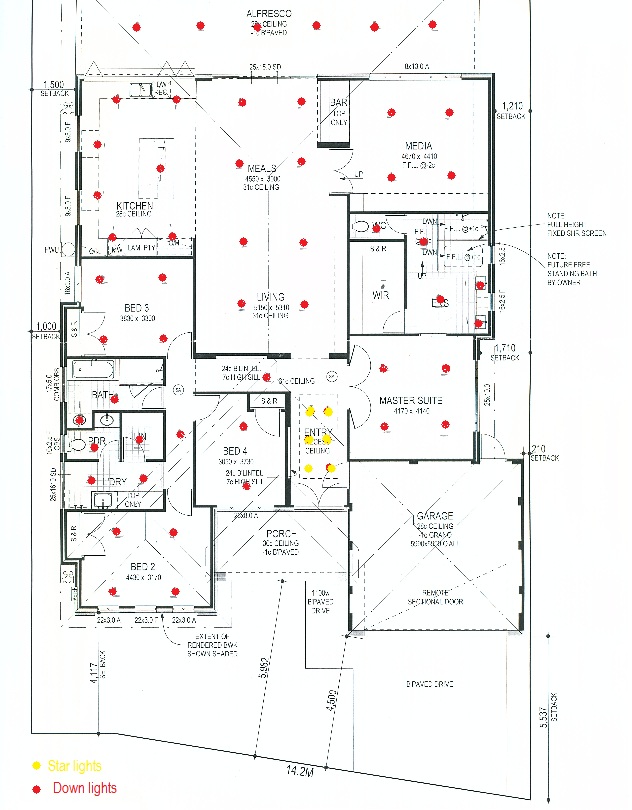
The first stage took approximately thirty minutes to complete. We started at the front of the house, worked our way inside, and finished at the alfresco. I really appreciated all the extra information and advice that Paley offered, for example:
  • making a note to see whether the builder is able to relocate or reposition some of our downpipes to make room for the wall mounted exterior lights;
  • combining exhaust fans and lights into a single unit, so that the WC and Powder Room ceilings would be neater;
  • grouping down-lights in the alfresco area to create individual areas for BBQ/cooking, eating, and relaxing; and,
  • choosing the correct colour of light to suit the primary function of the room. For example, white light in the study/gym to reduce eyestrain, whilst using traditional yellow light in the bedrooms to promote relaxation.

Lighting design produced by HS Reflections

The second stage is choosing fittings from the showroom so that the consultant is able to provide an accurate quotation. The consultant guides you through the showroom, offering suggestions and providing information about the products as you go. What I found unique about this show room was that you are able to turn on/off every light. If you have visited the show room before, or have a good understanding of the style of fittings you wish to purchase, this stage can be over in fifteen-twenty minutes.


Depending on the size of the job and/or how busy they are, it can take about three days to receive your quote. Unlike other quotations, HS Reflections itemises everything by room. I found this extremely useful, especially if you have to add, remove or change something – due to the way our picture recesses are constructed, we had to remove the starlights we had planned.

For a free service, I was amazed at the level of detail and the time spent creating the design for our home. I definitely recommend visiting HS Reflections for a lighting consultation. You will learn a lot and their prices are very reasonable.


A funny thing I will mention is the comment from our Pre-Start consultant when I pulled out the lighting design, "Oh, you've been to that place." Indeed, I have.
Related Posts Plugin for WordPress, Blogger...